What AI Video Generation Really Costs per Finished Clip
Advertised per-second rates are not what a finished clip costs. How revisions and hidden fees push real AI video costs to 3 to 4 times sticker, and how to budget for it.
Updated 8 min read18+
Advertised rates run roughly $0.02 to $0.70 per second, but a finished, publishable clip almost never costs the sticker number. Once revisions, cleanup, captions, and human review get counted, most creators pay 3 to 4 times the raw compute price. Plan on a moderate revision multiplier as your baseline, and let your format and monthly volume drive the decision, not the lowest per-second rate you can find.
TL;DR:
- Real finished video costs are typically three to four times the advertised per-second rate after revision, cleanup, captions, and human review are included.
- A median revision multiplier of around 1.4 to 1.8 times the raw compute cost applies, rising to 2 to 4 times for strict brand workflows.
- Additional expenses like voiceover, licensed music, and cleanup can add $5 to $30 per video, significantly increasing the final cost.
- Video format influences costs more than model selection, with multi-shot, cinematic videos costing up to $50 per 30 seconds, while slideshows are much cheaper.
- For creators producing fewer than 10 videos monthly, AI tools tend to be less cost-effective than hiring an editor, but at higher volumes, automation becomes more economical.
How Much Does AI Video Generation Cost Per Second?
Per-second pricing is the number every vendor leads with, and it's the number that misleads the most people. Market-wide tables put official rates anywhere from $0.02 per second on budget models like Pruna up to $0.70 per second on premium options like Sora 2 Pro.
Audio and resolution push the number further. Bundled audio typically isn't free. When it's billed separately, expect around $0.03 per second added to your base rate. Bump to 4K where it's offered and you're often paying 2 to 3 times the 1080p price for the same clip.
These are sticker numbers only. The next section is where the real budget lives.
How Do You Calculate the Real Cost of a Finished Video?
The gap between a quoted per-second rate and what you actually pay comes down to three things: the revision tax, hidden inputs, and your own time.
- Apply the revision tax. Almost nobody gets a usable clip on the first generation. Across measured production runs, the revision multiplier lands at a median of 1.4 to 1.8x sticker compute, climbing to 2 to 4x for brand-strict workflows that demand tighter consistency.
- Add hidden inputs. Voiceover, licensed music, captions, and color or audio cleanup rarely show up in the vendor's price calculator. Budget roughly $5–$30 for voice, $0–$15 for music depending on licensing, and $2–$10 for caption and cleanup passes, depending on how much you outsource versus do yourself.
- Price your own time. Even a "one click" generation needs a human to prompt, review, and pick a winning take. That's real operator time, and it belongs in your cost math even if no invoice reflects it.
Here's what that looks like on a 24-second clip across three tiers. A mid-tier model at $0.25/second runs $6.00 raw, roughly $9.60 after revisions, and closer to $20 once you add voice and cleanup. A premium model at $0.55/second starts at $13.20, pushes past $21 after revisions, and often finishes near $35–$40 with polish included.
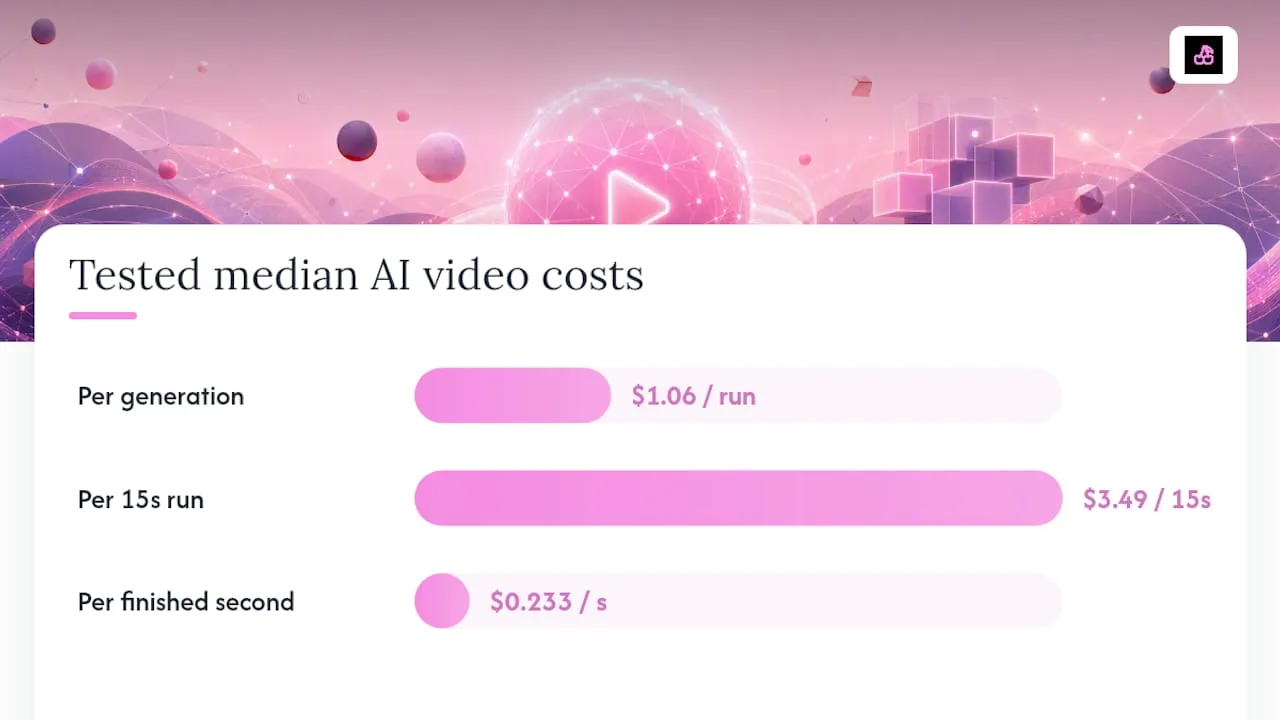
Statistic Callout: Measured production pipelines show a median generation charge of about $1.06 per run, but a pipeline dominated by 15-second clips showed a median full run cost of $3.49, or roughly $0.233 per second, once retries were counted.
What Do Different Video Formats Actually Cost?
Format matters more than model choice once you're pricing a real deliverable. A talking-head explainer and a multi-shot cinematic sequence draw from the same model catalog but land in wildly different price bands.
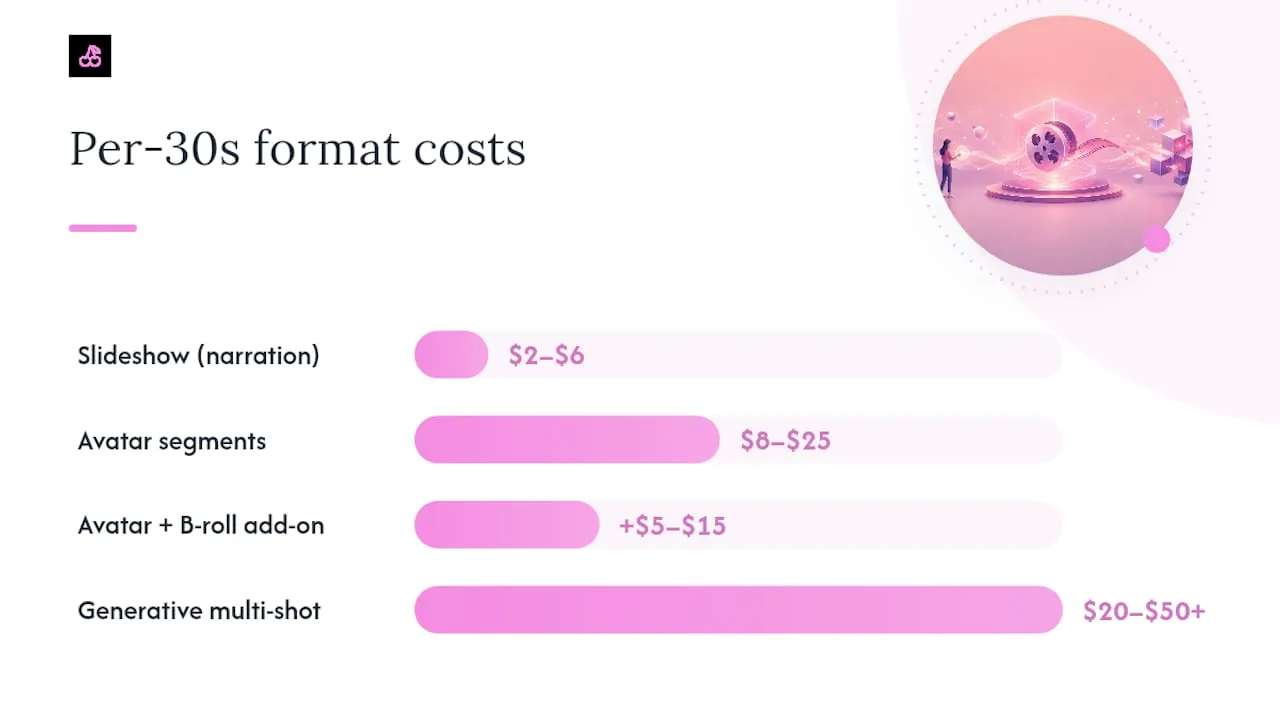
- Slideshow with AI narration: $2–$6 per finished 30-second clip. Low generative load, minimal revision tax, and operator time is mostly script and pacing.
- Avatar segments: $8–$25 per 30 seconds, with the range driven by avatar licensing tier and how much lip-sync and wardrobe polish you demand.
- Avatar plus B-roll: Add $5–$15 on top of the avatar cost for supplemental generative or stock footage and the editing pass to blend it.
- Generative-heavy, multi-shot: $20–$50 or more per 30 seconds at a production-ready bar, since every shot change risks another round of revisions.
Scale changes the math fast. At 10 clips a month you're mostly paying for learning curve and tool subscriptions. At 30 a month, per-clip cost usually drops as you reuse prompts, presets, and character references. At 100 a month, creators frequently report DIY tool stacks running $170 to $685 monthly before a single polished video ships, which only pencils out once your per-clip time drops sharply.
Pro Tip: Track your cost per finished second, not per generation. A clip that takes four tries at $0.10 per second costs more per usable second than one that nails it in one shot at $0.30 per second.
When Does AI Video Actually Beat Hiring an Editor?
Break-even isn't a fixed number. It shifts with your cadence and how picky you are about final polish.
- Solo creators: The AI workflow cost advantage usually shows up once you're producing around 5 videos a month, since even a cheap freelancer's per-video minimum stays roughly flat regardless of volume.
- Brand-strict teams: You typically need 30 to 50 videos a month before AI generation clearly beats a dedicated editor, because heavier revision cycles eat into the savings at lower volume.
- DIY compute route: Raw model fees alone run $0.07 to $0.40 per second, which sounds cheap until you add your own hours.
- Freelance AI creator: Expect $500 to $3,000 for a finished 30-second clip.
- AI production studio: Pricing starts near $5,000 for a polished 30-second piece, aimed at brand campaigns rather than routine content.
Match the route to your actual need. A creator posting daily shorts almost never needs studio-level polish, and a brand launching a flagship campaign almost never wants to gamble a launch video on a first-draft generation. Volume and quality bar decide the winner more reliably than which model has the lowest sticker price.
Which Billing Model Actually Saves You Money?
How a vendor bills you changes your real risk more than the headline rate does.
- Per-second billing is the most transparent option, but watch for clip-length caps and resolution multipliers that quietly double your effective rate.
- Credits and subscriptions work well for steady, predictable volume, but expiring monthly credits and hard plan ceilings punish creators with spiky output.
- Token metering, used by some vendors including ByteDance's Seedance, means your invoice is denominated in tokens, not seconds. The "per-second" figure you see is only an approximation, so run a test generation before committing budget.
- Reseller markups on white-labeled model access can add 20% or more over the vendor's own console price. Checking the model vendor's own console price against a reseller's quote is worth the five minutes it takes.
- Bundled audio differences and sudden API sunsets are the two most common sources of surprise mid-month charges. Read the fine print before you build a workflow around one model.
A Pay-Per-Render Option That Skips the Credit Guesswork
Everything above points to one recurring problem: subscription plans and expiring credits punish creators whose output is spiky, and revision cycles quietly inflate whatever "per-second" number got you in the door. OnlyNudes runs on pay-per-render pricing instead, with no subscription. You buy top-up packs from $5 to $100 and spend credits only when you generate, so a slow month doesn't burn a monthly allowance you already paid for.
The bigger cost lever for series creators is consistency. Building an AI character profile for 8 credits one time means every future photo set and clip reuses that same face and identity, cutting the retry cycles that drive up the revision tax on generic tools. Photo sets and clips have per-render credit costs, with commercial use cleared for platforms like Fanvue. If you're posting frequent shorts and need a face that stays the same from Monday to Friday, generate a clip and see how the per-render math compares to your current stack.
Why You Should Re-Run Your Video Budget Every Quarter
Per-second floors keep sliding down as budget models get cheaper, but don't mistake that for falling total costs. The revision tax stays stubborn regardless of which model you're on, and it's the tax, not the sticker rate, that decides whether your monthly spend is sane.
Watch three things going into the rest of 2026: which model tier you default to, whether your vendor still bundles audio for free, and whether token-metered billing has replaced the per-second pricing you built your budget around. The habit worth building isn't picking the cheapest tool once. It's tracking your effective finished-second cost every month and switching the moment a cheaper option stops meaning a cheaper finished clip.
FAQ
How much does AI charge for video?
Sticker rates run about $0.02 to $0.70 per second depending on the model, but finished, revision-adjusted clips typically cost 3 to 4 times that raw figure once cleanup and retries are counted.
Which AI is cheapest for video generation?
Budget-tier models like Pruna price near $0.02 per second, the low end of the official market-wide range, though the cheapest sticker price isn't always the cheapest finished-video cost after revisions.
How much does it cost to make a 15-minute AI video?
There's no single answer since format and revision load dominate the math, but at even mid-tier rates a video that long typically runs into the hundreds of dollars once voice, captions, and multiple revision passes are included.
Is the AI video generator free?
Most vendors offer limited free tiers or trial credits, but production-ready output almost always requires paid generation. OnlyNudes uses prepaid top-up packs starting at $5 with no subscription required.
Make the content you just read about
One reference, a line of text, and a feed's worth of photos and clips. Pay per render, no subscription.